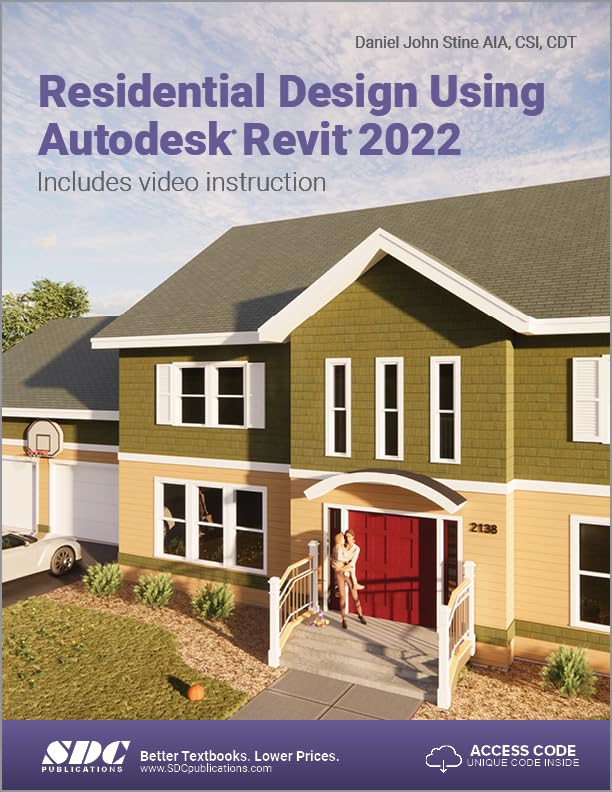

Residential design using autodesk revit 2022. / Daniel John Stine. txt
Editor: Mission, KS : SDC Publications, 2021Descripción: 1 volume ill. ; 28 cmTipo de contenido:- text
- unmediated
- volume
- 9781630574390
- 1630574392
- NA2728 S75 2021
| Imagen de cubierta | Tipo de ítem | Biblioteca actual | Biblioteca de origen | Colección | Ubicación en estantería | Signatura topográfica | Materiales especificados | Info Vol | URL | Copia número | Estado | Notas | Fecha de vencimiento | Código de barras | Reserva de ítems | Prioridad de la cola de reserva de ejemplar | Reservas para cursos | |
|---|---|---|---|---|---|---|---|---|---|---|---|---|---|---|---|---|---|---|
| Libro | CARIBET Biblioteca Arquitectura Colección General CARIBET | General NA2728 S75 2021 (Navegar estantería(Abre debajo)) | 1 | Disponible | 91000000067298 |
Descripciones mejoradas de Syndetics:
Residential Design Using Autodesk Revit 2022 is designed for users completely new to Autodesk Revit. This text takes a project based approach to learning Autodesk Revit's architectural tools in which you develop a single family residence all the way to photorealistic renderings like the one on the cover. Each book also includes access to extensive video training designed to further help you master Autodesk Revit.
The lessons begin with a basic introduction to Autodesk Revit 2022. The first four chapters are intended to get you familiar with the user interface and many of the common menus and tools.
Throughout the rest of the book a residential building is created and most of Autodesk Revit's tools and features are covered in greater detail. Using step-by-step tutorial lessons, the residential project is followed through to create elevations, sections, floor plans, renderings, construction sets, etc.
About the Videos
Access to extensive video training is also included with your purchase of this book. These videos break down each topic into several short videos so that you can easily navigate to a specific aspect of a tool or feature in Autodesk Revit. This makes the videos both a powerful learning tool and convenient video reference. The videos make it easy to see the menu selections and will make learning Revit straightforward and simple. It's like having the author by your side showing you exactly how to use all the major tools in Autodesk Revit.
1. Getting Started with Autodesk® Revit® 2022 --
1-1 What is Revit 2022? --
1-2 Overview of the Revit User Interface --
1-3 Open, Save and Close a Revit Project --
1-4 Creating a New Project --
1-5 Using Zoom and Pan to View Your Drawings --
1-6 Using Revit's Help System --
1-7 Introduction to Autodesk 360 Sef-Exam and Review Questions --
2. Lake Cabin: FLOOR PLAN (The Basics) --
2-1 Walls --
2-2 Doors --
2-3 Windows --
2-4 Roof --
2-5 Annotation and Dimensions --
2-6 Printing Sef-Exam and Review Questions --
3. Overview of Linework and Modify Tools --
3-1 Lines and Shapes --
3-2 Snaps --
3-3 Edit Tools --
3-4 Annotations Self-Exam and Review Questions --
4. Drawing 2D Architectural Objects --
4-1 Sketching Rectilinear Objects --
4-2 Sketching Objects with Curves Self-Exam and Review Questions --
5. FLOOR PLAN (First Floor) --
5-1 Project Setup --
5-2 Exterior Walls --
5-3 Interior Walls --
5-4 Doors, Openings and Windows --
5-5 Adding a Fireplace Sef-Exam and Review Questions --
6. FLOOR PLANS (Second Floor and Basement Plans) --
6-1 View Setup and Enclosing the Shell --
6-2 Adding the Interior Walls --
6-3 Adding Doors, Openings and Windows --
6-4 Basement Floor Plan --
6-5 Stairs Sef-Exam and Review Questions --
7. ANNOTATION --
7-1 Text --
7-2 Dimensions --
7-3 Tagging --
7-4 Shared Parameters --
7-5 Keynoting --
7-6 Adding Dimensions Sef-Exam and Review Questions --
8. ROOF --
8-1 Roof Design Options (Style, Pitch and Overhang) --
8-2 Gable Roof --
8-3 Low Roof Elements --
8-4 Skylights Self-Exam and Review Questions --
9. FLOOR SYSTEMS AND REFLECTED CEILING PLANS --
9-1 Floor Systems --
9-2 Ceiling Systems (Susp. ACT and Gypsum Board) --
9-3 Placing Light Fixtures --
9-4 Annotations Self Exam and Review Questions --
10. ELEVATIONS---
10-1 Creating and Viewing Exterior Elevations --
10-2 Modifying the Project Model: Exterior Elevations --
10-3 Creating and Viewing Interior Elevations --
10-4 Modifying the Project Model: Interior Elevations --
10-5 Design Options Self-Exam and Review Questions --
11. SECTIONS --
11-1 Specify Section Cutting Plane in Plan View --
11-2 Modifying the Project Model in Section View --
11-3 Wall Sections --
11-4 Annotation and Detail Components Self-Exam and Review Questions --
12. INTERIOR DESIGN --
12-1 Bathroom Layouts --
12-2 Kitchen Layout --
12-3 Furniture --
12-4 Adding Guardrails Self-Exam and Review Questions --
13. SCHEDULES --
13-1 Room and Door Tags --
13-2 Generate a Door Schedule --
13-3 Generate a Room Finish Schedule Self-Exam and Review Questions --
14. SITE TOOLS & PHOTO-REALISTIC RENDERING --
14-1 Site Tools --
14-2 Creating an Exterior Rendering --
14-3 Rendering an Isometric in Section --
14-4 Creating an Interior Rendering --
14-5 Adding People to the Rendering Self-Exam and Review Questions --
15. CONSTRUCTION DOCUMENTS SET --
15-1 Setting Up a Sheet --
15-2 Sheet Index --
15-3 Printing a Set of Drawings Self-Exam and Review Questions --
16. INTRODUCTION TO PHASING AND WORKSHARING --
16-1 Introduction to Phasing --
16-2 Introduction to Worksharing --
16-3 Phasing Exercise --
16-4 Worksharing Exercise Self-Exam and Review Questions --
17. INTRODUCTION TO REVIT CONTENT CREATION --
17-1 Basic Family Concepts --
17-2 The Box: Creating the Geometry --
17-3 The Box: Adding Parameters --
17-4 The Box: Formulas and Materials --
17-5 The Box: Family Types and Categories Self-Exam & Review Questions --
Appendix A: Autodesk User Certification Exam Introduction --
Index --
18. INTRODUCTION TO COMPUTERS --
18-1 Computer Basics: Terms and Functions --
18-2 Overview of the Windows User Interface --
18-3 File Management Introduction Self-Exam & Review Questions --
Appendix B — ENGINEERING GRAPHICS --
Appendix C — ROOF STUDY WORKBOOK — DRAFT EDITION --
Appendix D — FINDING MISSING ELEMENTS IN REVIT --
Appendix E — INTRODUCTION TO HAND SKETCHING --
Bonus Videos Index --
1 User Interface --
1-1 Introduction --
1-2 File Tab --
1-3 Ribbon and QAT --
1-4 Properties and Type Selector --
1-5 Drawing Area --
1-6 Status Bar --
2 Walls --
2-1 Introduction --
2-2 Wall Types --
2-3 Wall Placement Settings --
2-4 Wall Height --
2-5 Creating New Wall Types --
2-6 Sloped Walls --
3 Doors and Windows --
3-1 Introduction --
3-2 Placing Doors --
3-3 Placing Windows --
3-4 Managing Loaded Content --
3-5 Repositioning Doors and Windows --
4 Stairs --
4-1 Introduction --
4-2 Railings --
5 Roofs --
5-1 Introduction --
5-2 Hip Roof --
5-3 Gable Roof --
5-4 Shed Roof --
5-5 Flat Roof --
5-6 Roof Fascia --
5-7 Roof Gutters --
5-8 Roof Openings --
6 Floors --
6-1 Introduction --
6-2 Floor Placement Settings --
6-3 Floor Openings --
6-4 Sloped Floor --
7 Ceilings --
7-1 Introduction --
7-2 Ceiling Placement Settings --
8 Elevations --
8-1 Introduction --
8-2 Exterior Elevations --
8-3 Interior Elevations --
9 Sections --
9-1 Introduction --
10 Schedules --
10-1 Introduction --
11 Rendering --
11-1 Introduction --
12 Design Options --
12-1 Introduction --
13 Sheets and Sheet Lists --
13-1 Introduction --
14 Worksharing Introduction --
14-1 Introduction --
14-2 Worksharing Project Setup --
14-3 Creating a Local File --
14-4 Troubleshooting --
15 Phasing --
15-1 Introduction --
15-2 Phase Project Setup --
15-3 Phasing View Settings --
15-4 Phasing Element Settings --
16 Sweeps and Reveals --
16-1 Introduction --
16-2 Sweeps --
16-3 Reveals --
16-4 New Profiles --